Thursday, 15 April 2010

Deconstruction of Front Page

My Final Page

  • To keep my page neat and tidy as requested by my audience, I kept the headlines short by using a simple quote to advertise the main article. I also did this because it makes my cover a lot more modern and minimalistic. This also implies that regular readers will understand that when there is a model on the front cover, there will be an interview inside with this person, hence, instead of writing 'exclusive interview with 'Amber Martina' etc.' I just pulled a quote out of the interview that made the interview sound appealing and interesting and used that on the cover instead.

  • I made the speech bubbles either side of the text the same colour as the masthead simply to add more colour to the page, help it coordinate and make it look more modern and thought through.

  • I chose this font because it looks like the style of writing used for old fashioned films/stage shows. The connotations of this font is therefore 'old school' glamour and fame. This is closely associated with my chosen genre of music, helping to advertised my music magazines genre. As well as this, it also creates a theme on my front page.


I wrote this so as to excite fans of the 'artist', by not including her full name, it is implied that the readers will already be familiar with her. By taking this quote out of context and writing it off as a 'promise', I've also made the article within the magazine more appealing since it makes it seem as though a few revelations are made in the interview and as though 'Amber' is speaking directly to her fans. I wrote this in an italic and 'swirly' font style so as to make it appear feminine - relating to the artist and to contrast the delicate lettering against the boldness of the actual quote. The way in which it flows almost makes it seem as though the statement is 'set in stone'.

  • Instead of writing the word 'Plus' I used the symbol so as to keep the informality of the page. I did this because typically the social group my magazine is aimed at will use colloquial and informal language, as well as slang. This helps to appeal to this particular audience.

  • I made the '50' large with the rest of the text surrounding it because this creates an effective shape and design, making the page look more arty and modern. It's also similar to the logo of '50 cent', someone closely associated with the rap and R&B genre, helping to appeal to my target audience.

  • I did the word 'R&B in a different font since this particular font can be associated with my chosen music genre. This helps portray the genre of my music magazine, as well as making 'R&B' stand out, which also portrays my genre to potential readers.
  • I tried to make all of the text the same width so as to help it align and keep the cover tidy as well as creating a more rectangular/square shape around the '50'.

  • As an addition to the informality and colloquialism, I've used the word 'Tunes', meaning songs or music, to appeal to my target audience, the members of which typically have an informal sociolect.


I put the website beneath my barcode because people will look here to find the price, so they won't be able to miss it. I wrote the word 'Blast' in a bigger font to make it stand out. I also wrote it in the same font as the masthead so as to create a recognisable logo for it and to help people associate this font with my magazine.
I inserted the price into the barcode because they are most commonly found here, for example:


This also keeps my magazine cover neat and tidy as requested by my target audience

I included the stars name in large letters to grab attention. Capitals have been used so as to portray her high status and suggest excitement and exclusiveness of her being in the magazine. I coordinated it with the masthead to add effect and suggest that it's the main feature of the magazine by creating a link between the headline and the masthead.


I did this in grey so as to coordinate with the other colours in particular the models skin! I also did this so it would stand out against the black of my models dress. I used this Beyonce lyric to suggest the nature of the song and almost create an inside joke with both reader and writer since they will be familiar with the song. I also did this to suggest the genre music magazine mine is since such a lyric may not be picked up on in a music magazine that does not have an urban genre. Hence, this helps attract fans of R&B artists such as Beyonce - my target audience. My survey also told me that a large number of my target audience are big fans of Beyonce. Again, this helps to attract these potential readers.


I decided to make certain words bigger than others for effect and to make the layout look more interesting, modern and informal. Doing this also highlights the important and 'key' words; 'No', 'Broken' and 'Girl'. I did the 'No' in the biggest font to highlight the importance of the fact that she really isn't a 'broken hearted girl'. The use of this reassurance also suggests that other magazines and articles have suggested otherwise.


I positioned my model here so that her arm would be going off the page creating a nice effect. This also fits the page perfectly since her arm is right in the corner and there is plenty of space around her for the headlines and masthead. This also keeps the focus on the models facial expression and her pose is also just about visible.


I chose this colour because it coordinates with the black and white, creating a very modern look. Whilst blue has connotations of sadness and coldness, this bright shade is slightly happier and youthful. The use of a colour with sad connotations represents the feelings of the model on my cover. The use of a brighter blue represents the fact that whilst the 'star' was sad and 'blue', the story surrounding the picture although was sad, is now happy.


So as not to crowd the page or distract attention from the main story, I advertised the other artists who feature in the magazine in the space across the top. This creates a professional look and looks neat and tidy. I separated the names with small diamonds, the connotations of which are money and fame - associated very much rap and R&B artists, helping to imply my genre and keep this urban theme going. As before mentioned, this font implies glamour and fame, I therefore wrote the artists names in this font, in capitals, to make it look as though it is their names written on the cinemas/shows etc, implying high status and as though they are the best around at the moment. This helps to influence my readers, which magazines (music in particular) frequently do.

Front Page

Creating My Front Cover

I began to generate ideas for my front page by deconstructing other front pages in my scrap book. The two I deconstructed were from Clash and Vibe. By looking at these magazines I was able to see what modern music magazines tend to look like. For example, Both models on the covers are very airbrushed giving a glamorous look and the idea of perfection. This gave me the idea to give my own model a similar look. Both images are also head shots of the models, the main focus being on their facial expressions and few props have been used. This shows they're the main feature of the magazine, I therefore decided to do this with my own front cover.
The Vibe magazine cover is very plain, the main focus being on the main story about Rihanna and Chris Brown. I really liked the way in which there were no real headlines and instead just a mention of the names of the artists included in the magazine. I think this gives the cover a very modern and minimalist look, thus making it very fashionable. Since my target audience requested a neat and tidy cover I thought that I would try and include this type of layout in my own cover. However, I decided to use a variation of fonts and font sizes as well as different positioning of text around my page to make it look more interesting. Similarly to the Vibe cover, I used minimal headlines and decided to include only three, including the main story.
As well as this, I did use the feature of just including the names of artists within the magazine, but I wrote them above the masthead, giving my magazine a professional look. As well as this, since my image took up quite a lot of space, I didn't want to overcrowd the space around the image by putting too many headlines around it.

I really liked the way in which the model of the Vibe magazine's facial expression represented and indicated the nature of the story. I decided to create a similar look by making my model look moody and upset. I did this to create an image of the nature of the story. As well as this, I thought the way in which a lyric from a popular and well known R&B song had been used as a headline relating to the story on the Vibe cover was very effective and clever. I decided to incorporate this into my own magazine, changing it slightly to appeal to my younger audience by using a more recent lyric.

I also noticed from both the magazine covers that the masthead slightly overlapped the models heads. I did this on my own magazine cover because it creates a professional look as well as preventing the image from taking over the entire cover. This also prevents others from stealing the image since it has the magazines mark on it. As well as this, it makes sure you notice the headlines and masthead and not just the image on the cover.

Creating My Front Page

I started off by opening my chosen image into Adobe Photoshop. I chose this image because the shape of the model is perfect for me to surround it by a masthead and headlines. My model also has the perfect distant and unhappy expression I wanted her to have. The hand on her hip also makes her look like she's on the red carpet and therefore is exactly what I was after. I also like the way in whcih you can see the top part of her dress, making her look glamorous and showing she has dressed up, adding to the red carpet illusion. Despite this, the focus is still on her facial expression, hence I decided this was the perfect image.

To change my pictures background, I used the magic selection tool and highlighted the space around the model. I then selected Image > Adjustments > Levels. I then altered the levels so that the background turned completely white.


To make my models face look more bright and glowing I again used the magic selection tool to highlight both her neck and face and then repeated the above step (adjusting the levels).


To increase the 'glowing' and flawless look of my model, I used the eye dropper tool and clicked it onto my models face so that I would get the correct skin tone of the model. I then selected the brush tool and brushed it around my models face into the model had a completely even skin tone. I then selected edit, then fade and adjusted the dial so that the brush tool on my models face would look more natural and blended.


Again using the magic selection tool, I adjusted the levels once more, this time moving the dial in the opposite direction so as to make the models face slightly darker, helping to make it stand out against the light background. After this, I selected Image > Adjustments > Black and white.


Next, I used the magic selection tool to highlight my models lips. I then selected Image > Adjustments > Shadows/Highlights so as to make her lips look like they have make up on them and to make them stand out more, giving her a more glamorous and 'made up' look.


To help add to this, I also selected Adjustments > Image >Brightness/Contrast thus helping them to stand out more and making them darker.
Add Image


Again using the brush tool and then selecting Airbrush I used black to outline the models eyes, helping them to stand out and giving the appearance of wearing more make up. I also lined her eye lids with a light grey colour. I then selected Edit > Fade and faded the additions slightly to make them look more natural, blended and airbrushed. I decided to add the make up using Photoshop instead of putting actual make up on to the model before taking the pictures because such as the model on Vibe magazine, the make up looks very airbrushed and perfect, I felt this look would be easier and more effective to achieve using the computer.


To make my actual front cover, I used Adobe InDesign. To insert my Photoshop image into InDesign, I selected the picture box tool and dragged it across the part of the page I wanted my image to be. I then selected File > Place and inserted my photo. Next, I right-clicked the image and selected fitting > fill frame proportionally. This made my image fit into the box without stretching it out of proportion making it look blurry. Once I was happy with the positioning of my image, I inserted a text box above my models head and typed out my masthead in my chosen font. Again, I moved around the positioning of my masthead until I felt it looked best.


Next I edited the text colour to a light blue since I felt this colour coordinated nicely with the black and white as well as standing out effectively against it. It also has connotations of sadness and depression, coordinating with the models facial expression. To do this I highlighted the text and edited the colour using the colour panel. After this, I inserted another text box in the same way as I inserted the masthead. I then wrote out some of the names of the artists included within the magazine, similarly to the Vibe magazine. These artists are some of the ones that the feedback of my survey told me my target audience liked. I did these in black so that they were separated from the masthead but coordinated with the black and white of the image.


I wrote the name of the 'stars' full name in big capital letters to suggest high status and grab the attention of fans and potential readers. I made the name the same colour as the masthead so as to make it coordinate. Since the masthead is important and personal to the magazine, making her name the same colour as it suggests importance. This also makes the name eye catching and draws attention from the masthead down to the name. I placed both her name and headline below her so as to show the relevance between her and the headline. I also did this to highlight the fact that this article is the main article and to separate it from the other headlines. 'She's no broken hearted girl', is a lyric from a Beyonce song - I chose this because as I mentioned before it is a more modern lyric, appealing to my target audience whilst also having a similar effect to that of the Vibe headline. I made certain bits of the text bigger than the others to make the headline stand out and to make it look more stylised. I did this by adjusting the text options, making font of the selected words larger than others. The headline is grey so as to make it coordinate with the black white and grey image, this colour also coordinates with the blue. These mixtures of colour are also very modern and young - like my target audience.

I repeated the before step of inserting a picture box and placing the image of a barcode into the corner of my cover, making it look more professional. Beneath the barcode, I inserted a text box and wrote 'www.Blast.com' - my magazines website. I edited the word 'Blast' so that it was the same font as the masthead, helping people to familiarise themselves with the Blast masthead and logo.

I did this in grey so help it coordinate with the page and stand out against the black of my models dress, whilst also stopping it from stealing too much focus by using a bright colour.

I entered my first headline in the space around my model. I changed the font of it so that it coordinated with artists names above the masthead. I adjusted the quotation marks so that they were the same colour as the masthead so as to make them standout, making my magazine cover look more attractive and styled.
To rotate my headline I right-clicked the text box and selected rotate. I didn't want the image to be fully rotated, just slightly tilted so as to make it look as though the quote is coming from the model almost like a speech bubble.

Next, I entered my next headline, I made the '50' big so that I could fit the rest of the text around it, keeping the headline stylish and modern and making it fit into the space provided.


Using the Wingdings font I added diamonds to separate the artists names at the top of the page. I did these in the same colour as the masthead again to help coordinate the page.

I added a text box close to the '50' and edited the text so that it was aligned and near by stretching and adjusting it using the text options at the top of the page.

I edited the font for 'R&B' to give a more 'urban' look, helping it to stand out and highlighting the genre of the music magazine, helping to appeal to my target audience. I changed the font and colour of the '&' symbol to make the page more decorated and styled. This also prevents all the words blending into one and looking dull. Since my audience is fairly young, this stops the page looking boring and hard to follow. This also helps the page look coordinated and tidy.

Beneath this headline I added '...and what to expect from 2010'. By beginning this with '...' it appears to be an added bonus to the article. It is in lower case so as to suggest that it is not quite as important as the rest of the article/headline and indicating that this is only a small part of the topic.

Beneath the quote I added 'Amber's Promise' indicating that this quote is from the artist on my cover, 'Amber Martina'. This prevents the quote from looking random and as if it is a separate headline to my main feature. The statement 'Amber's Promise' gives hope to fans and suggests the positive nature of the article, contrasting to the sad look of the models face. I decided not to rotate this text like the rest of the quote so as to make it stand out. I also did it in a swirly italic font to make it look feminine helping it to relate to the artists. This font is also associated with my music magazines genre, helping to keep a running theme of the R&B genre on my front cover.

I also inserted a text box inside the space provided in the bar code. I rotated this text and wrote the price of the magazine. I decided to put this in the barcode since the price is usually found by the barcode on a magazine. Since there was space within the barcode however, I decided the page would look more neat and tidy within the actual code. I did this in black to help it coordinate with the barcode and did it in the same font as the artists names to help it coordinate with the rest of the page and separate the numbers to that of the actual barcode. I did the same for the date and issue number of my magazine, which i positioned above the bar code , giving my page a more professional look. I did this in grey to coordinate with the magazines website and to help it standout against the black of the models dress.

My final Product


The feedback I recieved showed that most people were very happy with my front page and my target audience found it appealing. My teacher suggested adding the date to my front page. This helped make my page look a lot more professional and I also added an issue number so as to make my magazine appear to have been running for quite a long time.

Wednesday, 14 April 2010

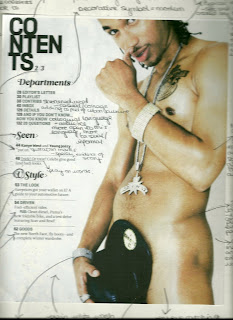
Deconstruction of Contents Page

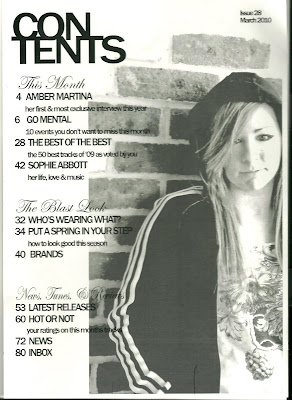
Final Contents Page

I laid the title of my contents page out like this to create a modern and original look. This layout also helps to create a casual and informal look, this partly conforms to the stereotype that fans of my chosen genre of music are youthful and unlikely to respond to a formal layout and appearance. As well as this, the title looks very modern, again this represents the social group of my target audience as being young and fashionable. Since even a small detail like the title of the contents page has been stylised, this also represents this social group as having attention to detail and caring about appearance.


I thought this to be the perfect font I had been thinking of in my plan. This is because due to its italic layout and swirly letters, it implies sophistication and upper class. I have challenged the stereotype of my young audience, fans of urban music, since these are not
necessarily features associated with my target audience nor necessarily fans of my genre, but they are associated with the artists of the urban genre of music since they try to portray an image of riches and luxury. This helps to portray the genre of my music magazine, thus appealing to my audience. As well as this, it helps to demonstrate the stereotype of said artists. I also chose to use this font for my categories so as to help them stand out and make my contents page look more interesting. This also helps to show that they are in fact titles and separate them from the rest of the text.


I used plain fonts for the page listings so as to help keep the page neat and tidy as requested by my target audience in my survey. I wrote the titles in capitals similarly to the contents page I previously deconstructed. I also did this since writing in upper case can be associated with my chose genre of music, thus it helps to appeal to my audience and keep the urban theme going. I did the descriptions in the same font but in lower case to help the two contrast and also to create a stylised look, since typically members of my audience are again interested in appearance. This shows attention to detail and is not often seen in magazines or other media forms, hence it creates a certain image for my magazine. The description also helps to appeal to readers since it implies something is happening that they may miss out on - something everyone else will be going to. The results of my survey as filled in by my target audience also told em that events were very important as far as my readers were concerned and therefore I made sure to include a listing to do with events on my contents page.


This suggests that 'Blast' sets trends - something associated with the artists of my chosen genre who are often known have their own 'look'. This will ring true with my readers and again helps to portray the genre of music magazine mine is.


This list almost rhymes, making a catchy headline. This may be seen to refer to some of the music of this genre which is known for being both catchy and rhyming. As well as this, I've used colloquial words such as 'Tunes' to refer to music. This is both informal and casual and will appeal to my target audience due to its colloquial nature.

Titles such as this do not have any description, suggesting that they are regulars in the magazine, suggesting I have long term readers. On top of this the use of the word 'Inbox' to show that this page is where peoples letters and thoughts go, shows that the readers use email to communicate with the magazine as opposed to letters. This portrays the magazine as modern and the readers as young since this a modern form of communication. This is a use of technology jargon - something younger members of the public are more friendly with.


I made the picture quite transparent so that whilst it would be a focus of the contents page, it would also be part of the background and could be partly written on. The combination of black and white was almost too strong to begin with whilst the picture was completely opaque as well. The image almost represents the readers, looking young and casual. This image conforms to the stereotype that all teenagers and young adults do is hang round on street corners wearing hoodies. I decided to conform to this particular stereotype because it has strong connotations of my particular genre. As well as this, a lot of artists associated with this genre are American. Since this stereotype is strongest in England, I included it because it helps to demonstrate that despite the fact that most of the artists that will appear in the magazine are American, this magazine is British. This image is also in reference to page 42 'Sophie Abbott - her life, love and music'.' Whilst some magazines may have written the page number and story title actually on the image so as to demonstrate that the image is relevant to that particular story, I decided not to. This narrows down my target audience strictly to people who are familiar/fans of this genre of music. This is done via the way in which people will have to know who the image is of in order to know which story she is in reference to.

The issue number and date have been written here just to date the page for any future reference since magazine pages can be often found on the Internet. Some magazines also choose upload certain pages to their website, this shows that this is a possibility with my magazine. This also helps give the magazine a professional look.


Monday, 12 April 2010

Contents Page

Inspiration

I started to generate ideas for my contents page by looking at layouts of other magazines with a similar audience to mine. The most helpful to me was Vibe magazine. I deconstructed this contents page to begin with, which helped give me ideas for my own contents page. For example, the way in whcih the contents title is layed out makes the page look modern and stylised as well as casual. Hence, I decided to do a similar thing with my own title. As well as this, I liked the way in which the text was surrounding the image and the imaged is the main part and focus of the page. I decided to do this with my own contents page, I decided this having looked at contents pages from magazines such as Clash. This was the other contents page I decided to deconstruct. Comparing the two contents pages helped me to generate ideas for my own page since I decided that I was not a fan of the layout of the contents page from Clash. I felt that Clashs contents page was too formal and the layout and structure was too apparent, compared to Vibes contents page which was a lot more simple and any layout boxes used to help are no longer visible, helping it look more casual.
For my own contents page, I wanted to create a more modern look, similar to that of . As well as this, I looked at the kind of headlines used by the contents pages. I liked the way in which had used subtitles for its headlines such as 'V Style'. This obviously indicates that creates trends, thus giving the magazine a higher status as well as relating to its trend setting audience. I decided to do something similar with my own contents, 'The Blast Look', this creates a similar effect but instead creates an entire 'fashion' associated with my magazine, thus raising its status and helping it stand out in its genre. Looking at the two contents pages also helped me to come up with the idea to seperate my headlines into subcatagories - 'This Month', 'The Blast Look' and 'News, Tunes & Reviews'. As well as this, they gave me the idea to simply keep page titles to two or three words, creating catchy headlines that could potentially be used as 'regulars' in my magazine. As well as this, I decided to put a short description beneath said headlines. I only did this to headlines that required explanation and headlines that were not regular features. For example, each headline in the 'This Month' catagory have descriptions since they are features independant to that months issue and people will not be familiar/instantly know what the article consists of. I did not do this for regulars that do not require explanation such as 'News' and 'Latest Releases', headlines such as 'Brands' were left without description so as to indicate that they are regular features and that the magazine assumes you are a regular reader who will already be familiar with the features.

The contents page also gave me the idea to use capital letters for the headlines, helping them to stand out and discouraging them from blurring into one. This then gave me the idea to make the descriptions entirely in lower case, contrasting the two and creating a stylised look. I also liked the way in which the catagories has been written in italics, I decided to use a swirly and decorative font since such writing is favoured by artists of my genre, thus associating it with my chosen genre of music. This font style has been used by several artists relevant to my genre, for example:


I also decided to include the month and year of the release of my issue on my contents page, as has been done on the Clash contents page, thus making my page look more proffessional. As well as this, I also

decided to include the Issue number of the magazine again to create a more proffessional look.


Making My Contents Page

This is the image I decided to use for my contents page.
I took this image since it looks urban and informal, which is exactly the look I needed for my magazine. My models casual clothes and pose also contrasts and differs to that of my dressed up model on the front cover.
I inserted this image into Adobe Photoshop to edit it for my contents page. I began by using the magic selection tool, selecting the parts of the image I no longer wanted. I selected random parts around the bricks so that instead of getting a square box shape around the image, I created uneven brick shapes around the image, creating a more effective and interesting image. Having selected the parts of the image I no longer wanted, I selected Adjustments > Levels and then adujsted the levels so that my selected area turned white, fading it into the background.
Having successfully selected the part of the image I wanted to keep, I cropped the image so I was only left with what I needed and no longer had excess background surrounding the image. I did this by selecting the crop tool and dragging the selection box around the part of the image I wanted to keep. I then right clicked on the highlighted section and selected crop. Next, I again used the magic selection tool to select the part of the image I wished to edit. I then selected Adjustments > Levels and arranged the dial to give my model a more glowing, airbrushed look.

Next, I selected Image > Adjustments > Black and White. I added this particular effect so that my contents would coordinate nicely with my cover, thus giving my magazine a kind of theme. I selected Maximum Black to help the shadows of the image to stand out and creating a bolder, more effective image. To add to this shadow effect, I next selected Adjustments and then Shadow/Highlights, adjusting the dial until I had created my desired effect of making the model stand out against the background and creating a more polished look.

I used the Eye dropper tool to select my models correct skin tone. I then selected the Brush tool and clicked on the Brush icon shown in the image so I could select the Airbrush tool. I then used this tool to touch up my models face, making her skin look absoloutely flawless as the airbrushed look is very popular amongst artists of the R&B genre. I then used the same brush tool in black to add eye make up to my model, simply by outlining her eyes makign them stand out more. To make sure both these effects looked as natural as possible and as if they were there when the image was taken, I selected Edit and then Fade, adjusting the dial to the point that the effects were noticeable but did not look computerised.

Once I was done editing my image, I opened Adobe InDesign so I could create my actual contents page. First, I used the Picture Box tool to create an idea of where to position my image. I then selected File > Place selected my image file so as to insert it into the box.

To make my image fit the box without stretching it and making it look out of proportion, I right-clicked the image and then selected Fitting > Fill Frame Proportionally. This prevents the image looking blurry when inserted.


I decided to have the image going slightly off the page since this creates a nice effect as well as leaving room for the contents page text. Doing this also prevents an unnecessary excess amount of bricks being on the page. To move the image without moving the frame I used the hand pointer to move the image around within the frame and position it into an effective and attractive position.

I also changed the transparency of my image so that it would fade slightly into the background so that although the image would be a large feature of the page, it would be more of a background to the text. I also did this so that the image could have some text on it, creating an informal and almost 'thrown together' effect. This also creates an artistic effect and keeps more attention on the text than on the image. I achieved this effect by rick-clicking the image, then selecting effects, and then transparency. I then adjusted the percentage of transparency until I felt the image looked its best and I had achieved the desired effect.

I made my image this amount of transparency so that it is still strong enough to be seen and isn't too faded into the background to be insignificant to the page, yet still transparent enough to be seen as part of the background and not pull too much focus. It is also transparent enough for text to be overlapping slightly onto it and still be visible.


I inserted the text using the text box tool and dragging it into what I felt to be the appropriate area. I decided to put the title in the corner as opposed the centre so as to make a point of the fact that the text was on one side of the page. This also made the page look neater and more coordinated and thought out. Given my layout of the title this also made it look as though the title had been compressed into the corner, giving a modern and casual look. I kept the page listings in one text box so as to keep all the text aligned and neat. However, I did insert the word 'Contents' into a separate text box so that I could experiment with its positioning around the page and so that I could adjust how close it was to the page listings and image. I also did this to keep it separate from the rest of the text and in a slightly different alignment.
I decided to lay the contents title out like this because the vibe contents page I deconstructed had a very similar design (and audience) so I felt it appropriate as this is clearly the most fashionable way in which to layout such a title. This also adds to the informal feel of my page.

By adjusting the text options I made the bottom and top text closer together (the 'Con' and the 'Tents') so that it is made clear that it is all one word. This also gives it a more modern and youthful look/layout. I also adjusted the text options by making the letters wider, this stretched the text out a bit more and made it full more space without having to actually alter the font size. I did this because I liked the size and positioning of the text but it wasn't quite filling up enough space and didn't look quite right so far away from the image. I therefore adjusted it until I felt it looked appropriate. I also made the letters fairly close together so as to make it look modern and stylish as well as making the text fit into the amount of space provided.

I did the categories in an italic and decorative font so as to separate them from the rest of the text and because of the before mentioned connotations of such a font. This also helps give the page a more attractive look. I did the page headings in capitals to separate them from the descriptions and again for the before mentioned reasons. Contrasting to this, I did the descriptions in lower case for a modern and stylish look. I chose a simple and almost plain font so as not to overcrowd the page and make it look too 'busy'.


Feedback from others helped a lot with the creation of my contents page. Most were very happy with my finished product and the main suggestion I got was to include the the date. I decided this was a good idea because as I mentioned earlier this has been used in other magazines such as Clash. I developed this idea by also including the Issue number of the magazine. Since magazine pages frequently end up on the Internet, I included this to show exactly when the magazine was created and which issue it is, creating a more professional and realistic look. I put this feature in the top right hand corner, sort of away from everything else. I did it in plan writing and did not use any stylish features, I did this so as not to pull away any focus from the rest of the information on the page because for obvious reasons it is not the most important part of the page.


Final Product.